
A Digital Spirit Level is a modern measuring tool that helps users check whether a surface is perfectly horizontal or vertical. Unlike a traditional bubble level, it uses electronic sensors to detect changes in angle. The device then converts this movement into a digital reading, often shown in degrees, percentage, or millimeters per meter. Some models also provide audible alerts, illuminated displays, or magnetic bases for hands-free use.
The operating principle is practical but not mysterious. Inside the instrument, an accelerometer senses Earth’s gravity and identifies the tool’s position. A microprocessor interprets that information and presents the result on the screen. Before measuring, users should place the device on a stable reference surface and follow the manufacturer’s calibration instructions. Even a small amount of dust beneath the edge can affect accuracy.
Accuracy matters.
In construction, cabinet installation, plumbing, metalwork, and home improvement, a reliable reading can prevent visible gaps, uneven shelves, or drainage problems. Professional users typically compare readings, check battery condition, and avoid trusting one measurement without inspection. A Digital Spirit Level is helpful, but it is not infallible. Temperature changes, damaged sensors, weak batteries, and careless handling may produce misleading results. Some inexpensive models also appear precise while offering limited calibration control. That detail deserves attention. Understanding how the tool works allows users to question its readings, select suitable equipment, and combine digital measurements with careful physical checks.
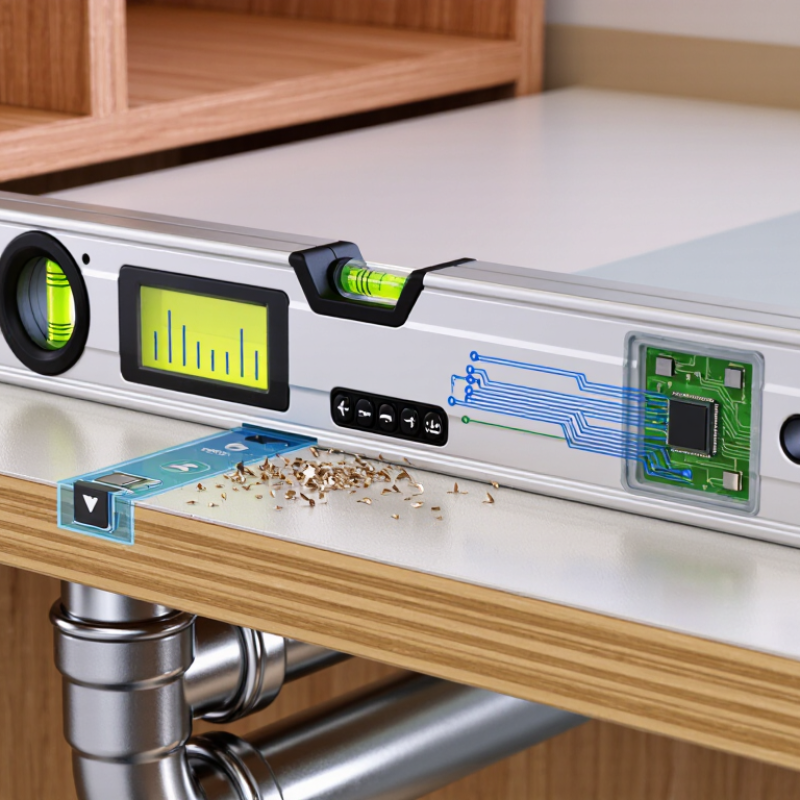
A digital spirit level is a measuring tool that shows whether a surface is level, plumb, or angled. Unlike a traditional vial, it uses electronic tilt sensors to detect its position. The sensor reads changes in gravity and sends the data to a small processor. The result appears on a screen, often as degrees, percentage, or a directional guide. In practical use, this makes readings easier to see in dim spaces or from an awkward angle. The tool still has a rigid body, so its edge can rest against a shelf, frame, pipe, or wall.
Most digital spirit levels need calibration before demanding work. Place the level on a stable surface, record the reading, then turn it around and compare. If the result changes, the tool may need adjustment or service. Keep the measuring edge clean. Even a small chip or layer of dust can affect contact. I have found that a bright display saves time, but it can also encourage careless readings. Wait for the numbers to settle. A moving reading may reflect vibration, temperature changes, or an uneven hand.
A digital spirit level helps with cabinets, floor slopes, equipment, and posts. Its accuracy depends on sensor quality, calibration, battery condition, and careful handling. It does not replace sound judgment. On a long surface, check several points instead of trusting one reading. I still recheck important measurements, because convenient tools can create false confidence. Short checks help.
A digital spirit level converts tilt into an electronic reading. Its main sensing element is usually a MEMS accelerometer. This tiny sensor detects gravity along one or two axes. When the tool tilts, gravity changes the measured acceleration on each axis. A processor converts that difference into degrees, percent slope, or millimeters per meter. The display then shows the result on an LCD screen, often with an audible signal near zero.
Key components include the sensor, microprocessor, display, battery, calibration memory, and a rigid reference frame. The frame matters. A small bend can create a consistent error, even when the electronics work correctly. Some instruments also include temperature compensation because sensor output can drift as the housing warms. NIST Technical Note 1297 explains that measurement results should include uncertainty, not only a single number. It identifies a coverage factor of k=2 as a common basis for roughly 95% coverage.
Practical measurement still depends on handling. Place the level on a clean surface, wait for the reading to stabilize, and check it in both directions. ISO 17123-2 provides field-testing principles for leveling instruments, including repeated observations and comparison procedures. A useful check is to rotate the tool 180 degrees and compare readings. Ideally, the values should agree closely. They may not. A hurried operator can trust a bright screen too quickly. Vibration, dust, weak batteries, and poor calibration can quietly distort the result. Digital does not mean infallible.
A digital spirit level uses a MEMS accelerometer to sense Earth's gravitational field. As the level tilts, gravity is divided between the measuring axis and the reference axis. The chart shows the theoretical acceleration components calculated from ax = g × sin(θ) and az = g × cos(θ), where g = 9.81 m/s².
At 0°, the reference axis detects approximately 9.81 m/s² and the measuring axis detects 0 m/s². At 90°, these values are reversed. The sensor converts this gravity-vector change into an angle reading.
A digital spirit level measures the angle of an object against Earth’s gravity. Inside, a small electronic sensor detects movement and tilt. Many models use an accelerometer, while advanced designs may add a gyroscope for smoother readings. The process begins when you place the tool on a surface. Gravity pulls the sensor’s internal mass downward. The sensor converts that position into electrical signals. A processor then calculates the angle in degrees. The screen displays the result almost instantly.
Calibration affects every reading. Place the level on a stable, known-flat surface and activate its calibration function. The device records that position as zero degrees. When you move it, the sensor compares the new position with the stored reference. A clear beep or changing display may indicate level, plumb, or a specific angle. Keep your hands steady during measurement. Even slight pressure can lift one edge and change the result. I have sometimes trusted a quick reading too much; checking the tool in the opposite direction can reveal a small error. Temperature, battery condition, and surface vibration may also influence accuracy. For dependable work, take two readings and compare them. Small differences matter.
| Working Dimension | Component or Step | How It Works | Typical Result or Practical Detail |
|---|---|---|---|
| Definition | Digital spirit level | A measuring tool that determines the angle or inclination of a surface relative to the direction of gravity and displays the result electronically. | The reading is usually shown in degrees, percent slope, millimeters per meter, or a vial-style visual format. |
| Reference | Earth's gravity | The instrument uses gravity as its reference for identifying a level position at 0° and a vertical position at 90°. | A horizontal surface is approximately 0°, while a vertical surface is approximately 90°. |
| Motion detection | Electronic inclination sensor | An accelerometer detects the gravitational acceleration vector and measures how the tool is tilted along one or more axes. | Single-axis models measure one direction; dual-axis models can measure pitch and roll simultaneously. |
| Signal processing | Microprocessor | The internal processor converts sensor signals into an angle by applying calibration data, filtering, and mathematical calculations. | Filtering helps reduce unstable readings caused by hand movement or vibration. |
| Measurement output | Digital display | An LCD or LED display presents the calculated inclination in a numerical format that can be read without interpreting an air bubble. | Common display units include degrees, percent, and millimeters per meter. |
| Visual guidance | Electronic indicators | Many models use arrows, symbols, or colored indicators to show whether the tool is tilted above or below the level position. | The indicator changes as the surface approaches 0° or 90°, helping users make quick adjustments. |
| Step 1 | Place the tool | The measuring surface is placed firmly against the object being checked, such as a shelf, pipe, frame, or construction surface. | Direct and stable contact helps prevent errors caused by gaps, dirt, or movement. |
| Step 2 | Activate the instrument | The power button turns on the sensor system and display. Some instruments perform a short start-up stabilization period. | The display may briefly show a start-up screen before presenting a measurement. |
| Step 3 | Allow stabilization | The sensor continuously detects gravity while the device settles. The user should hold the level still during this stage. | A steady reading is generally more reliable than a value observed while the tool is moving. |
| Step 4 | Read the angle | The processor calculates the inclination and updates the numerical display in real time. | A reading of 0.0° indicates a level condition within the instrument's accuracy and resolution limits. |
| Step 5 | Adjust the surface | The user changes the position of the object until the displayed angle or electronic indicator reaches the desired target. | For a vertical installation, the target is commonly close to 90.0°. |
| Measurement range | Inclination range | The usable range depends on the sensor and model design. Many digital levels measure across a broad range around 0° and may also support vertical measurements. | Typical tools can measure from approximately -90° to +90°; the exact range must be checked for the specific instrument. |
| Resolution | Smallest displayed increment | Resolution describes the smallest change shown on the screen, while accuracy describes how close the reading is to the actual angle. | Common display resolutions include 0.1°; higher-resolution instruments may display 0.01°. |
| Accuracy | Measurement tolerance | Accuracy is affected by sensor quality, temperature, orientation, calibration, battery condition, and the stability of the contact surface. | Typical digital levels may specify an accuracy around ±0.1° to ±0.2°, depending on the operating range and model. |
| Calibration | Zero-setting procedure | Calibration establishes the instrument's reference position on a known level or reference surface and compensates for small sensor offsets. | Calibration should be performed on a stable surface and repeated if the tool has been dropped or exposed to strong impacts. |
| Measurement modes | Angle, slope, and pitch modes | The same inclination data can be converted into different formats for construction, woodworking, machinery setup, and drainage work. | Examples include degrees, percent grade, millimeters per meter, and ratio-based slope readings. |
| Power source | Battery system | Small batteries provide power for the sensor, processor, display, and audible or visual alerts. | Automatic shutoff is commonly used to reduce battery consumption when the tool is not operated for a period of time. |
| Environmental factors | Temperature and vibration | Rapid temperature changes, vibration, electromagnetic interference, and unstable handling can influence electronic measurements. | Allowing the tool to reach the working temperature and taking readings while stationary improves repeatability. |
| Comparison with a bubble level | Electronic versus vial reading | A traditional spirit level uses an air bubble in a liquid-filled vial, while a digital model uses an electronic sensor and numerical display. | Digital models offer easier angle reading and additional units; bubble levels do not require batteries. |
| Best practice | Verification and repeat measurement | The tool should be checked on a known reference surface and, for critical work, the measurement should be repeated after reversing the tool's orientation. | Consistent readings in both directions can help identify contact-surface problems or calibration errors. |
Note: Accuracy, resolution, measuring range, display units, and operating temperature vary by instrument design. The values shown above are general characteristics and typical ranges rather than specifications for a particular model.
A digital spirit level uses electronic sensors to measure horizontal and vertical angles. Unlike a traditional bubble vial, it converts tilt into a numerical reading. An internal processor then shows the result on a screen. Some models also provide an audible signal when the tool reaches level.
Main features include a clear display, selectable angle units, and a zero-setting function. Many tools measure degrees, percentage slope, or millimeters per meter. A magnetic edge can help the level stay attached to steel surfaces. Backlighting improves visibility in dim rooms. Still, extra features do not guarantee better measurements.
Accuracy depends on sensor quality, calibration, and surface condition. Dust beneath the tool can create a small but meaningful error. A damaged frame may also distort readings. Temperature changes can affect electronic sensors, especially during outdoor work. Let the tool adjust to the working environment before measuring.
Check it against a known level, then rotate it 180 degrees and compare both readings. A noticeable difference suggests calibration may be necessary. Resolution is not the same as accuracy. A display showing 0.01 degrees can still report a poorly calibrated measurement. That detail is easy to overlook. Regular battery checks also matter, because weak power may cause unstable readings. The most reliable results come from careful setup, repeated checks, and realistic expectations.
A digital spirit level uses an electronic inclinometer to detect tilt along one or two axes. Its sensor measures changes in gravity, then converts them into degrees, millimetres per metre, or a percentage slope. A small screen gives faster readings than a bubble vial, especially in dim workshops or noisy construction areas.
Its practical value is clear. Workers check door frames, drainage falls, cabinets, solar mounts, and machine bases with one tool. The U.S. Bureau of Labor Statistics reported about 1.6 million construction and extraction jobs in 2023, showing the scale of work where quick alignment matters. In field use, I would still rotate the level 180 degrees and compare both readings. It catches sensor bias.
Accuracy has limits. Temperature changes can shift electronic readings, while dust, impacts, and weak batteries may affect performance. A level can also display a precise number on an unstable or dirty surface. That number may look authoritative, but it is not automatically correct. NIST Technical Note 1297 stresses that measurement results require stated uncertainty, not confidence alone. Calibration against a known reference remains important. ISO 17123 field-testing principles also support repeated observations and documented conditions. Many users skip this step. I have, too, when a project seemed simple. That shortcut deserves reconsideration. A digital level improves speed, but it cannot repair poor contact, movement, or an unsuitable reference surface.
Contact Us